


Tournaments
Stop filling in the decklist sheet by hand
By Johnnie Tirado
Founder of DeckSequence and competitive Pokémon TCG player.
· 5 min read
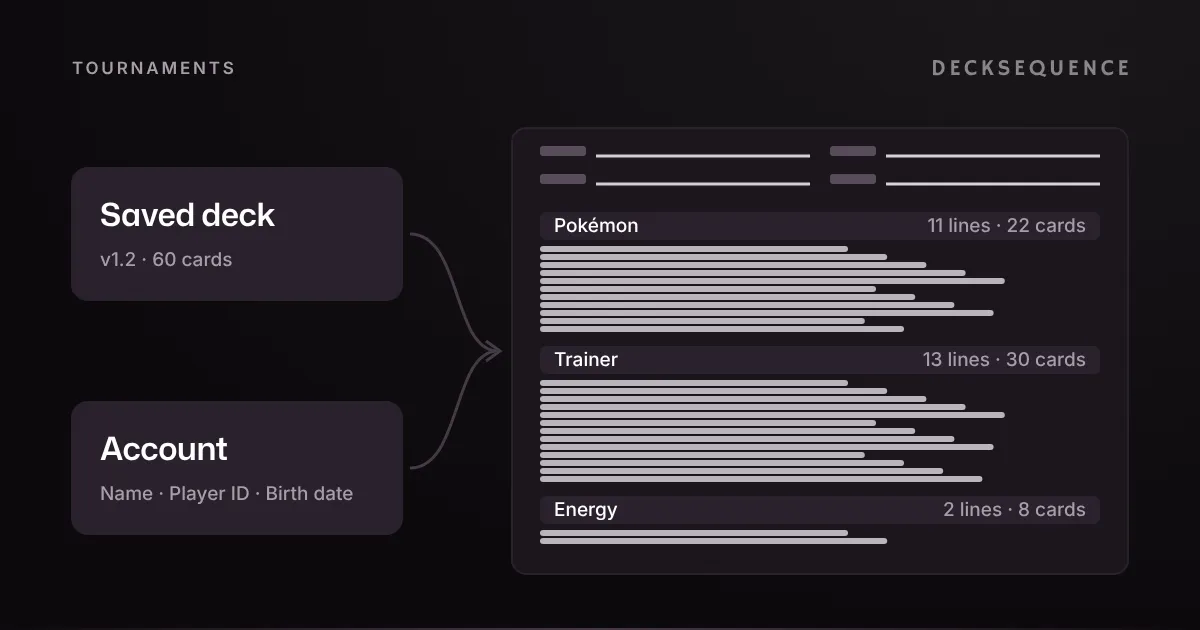
A Play! Pokémon deck registration sheet asks for your name, Player ID, date of birth and age division. Then it wants every card in your deck, sorted into Pokémon, Trainer and Energy, with columns for set, collector number and regulation mark. For the sample 60-card list below that's 26 card lines and 124 separate entries, and DeckSequence fills in every one of them from your saved deck and prints the sheet as a PDF, free.
What the sheet asks for
Most store events ask for a decklist at registration, and a deck check confirms your deck matches it exactly. The sheet has two parts.
The player block. Your name, your Pokémon Player ID, your date of birth as MM/DD/YYYY, and a tick for your age division. The division boxes print the season's birth years, so for the 2027 season a player born in 2015 or later ticks Junior, 2011 to 2014 ticks Senior, and 2010 or earlier ticks Masters. The age divisions article explains how the cutoffs move each season.
The card tables. Three sections, Pokémon, Trainer and Energy, adding up to 60 cards. On the sheet DeckSequence prints, a Pokémon or Trainer line has five columns: quantity, name, set, collector number and regulation mark. An Energy line has two: quantity and name.
None of it is hard. It's just slow, and the slow part is where mistakes come in: a 3 written where you play 4, a collector number from the wrong printing, a count that doesn't add up to 60.
A worked example: 26 lines for one list
Take a sample Dragapult Dusknoir list on v1.2. It's the DeckSequence demo deck, not a tournament list, and every Pokémon and Trainer in it carries an H, I or J mark, so it's legal in Standard.
Sorted the way the sheet wants it, the 60 cards come to:
| Section | Lines | Cards | Entries to write |
|---|---|---|---|
| Pokémon | 11 | 22 | 55 |
| Trainer | 13 | 30 | 65 |
| Energy | 2 | 8 | 4 |
| Total | 26 | 60 | 124 |
Each Pokémon and Trainer line is five entries, so 24 lines make 120, and the two Energy lines add 4 more. On top of that are the four player fields. The set column alone covers nine different set codes for this list, and the regulation marks split 13 H, 5 I and 6 J, each of which you'd normally look up on the card.
Here's the top of the sheet DeckSequence printed for it, from a sample account with a name and date of birth saved but no Player ID:
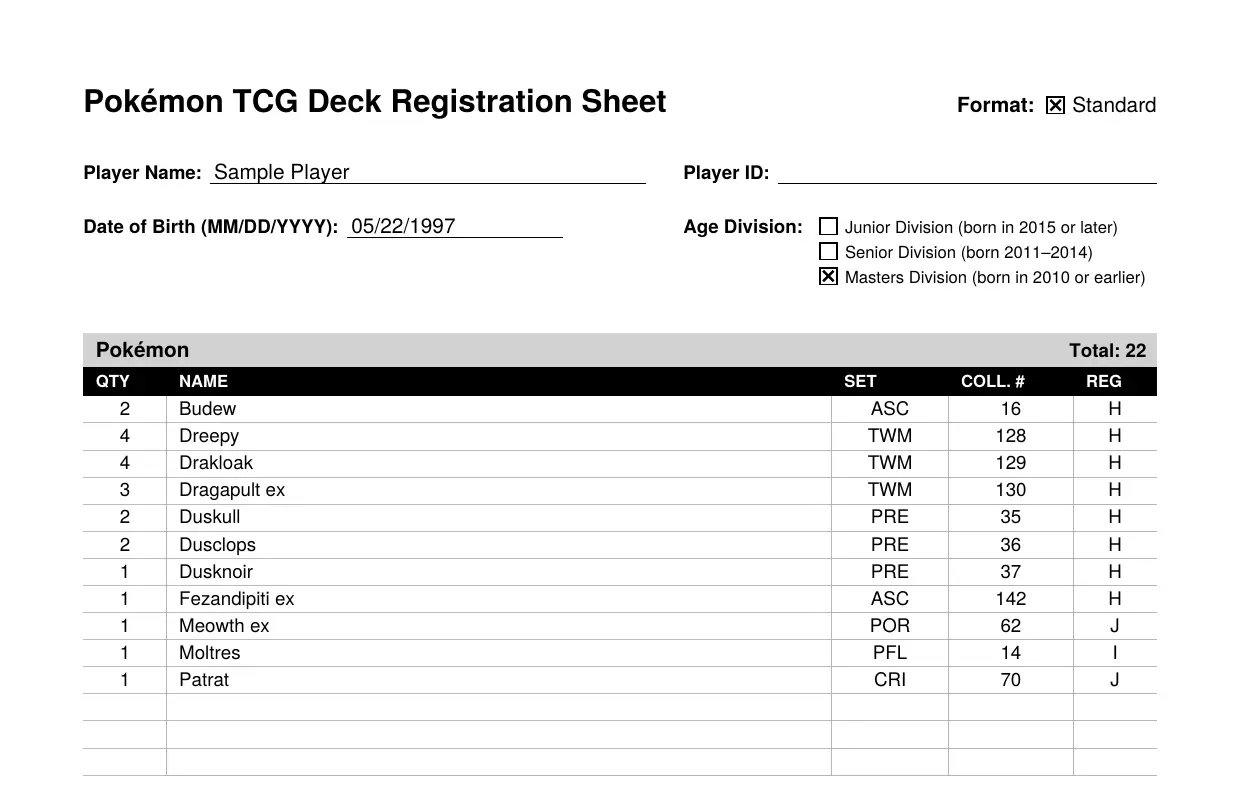
The Player ID prints as an empty ruled line, ready to fill in by pen. The sample date of birth, 05/22/1997, puts the account in Masters, so that box is ticked. Every Pokémon line has its set, number and mark, the section shows its total of 22, and the spare ruled rows under it are there if you need to correct a line at the table. The Trainer section follows the same way, and Energy lists quantity and name, with Total Cards: 60 at the bottom, all on one page.
Getting yours
Add your legal name, Player ID and date of birth to your account once. After that, open a deck and choose Tournament decklist from its export options, or open it from a tournament to get the version you played that event with. The tournament decklist guide has the steps for the app and the web.
Before you print, the sheet lists anything to fix under Check before you register: a deck that isn't 60 cards, a card that isn't legal in Standard, or a card with no regulation mark on file. On the sample list, the only note was the missing Player ID. The card side came back clean.
It's built from the deck's saved version. If you've changed the list and not saved, those edits aren't on the sheet, which is what you want when the version you registered is the one you'll be checked against. Saving the change as a new version, say v1.3, keeps the matches you log on each list apart too.
Print the PDF to hand in, or share the same sheet as plain text for an online registration. It's free, with no limit on decks, and the sheet itself is built on your device.
What you still write by hand
Less than before, but not always nothing:
- Anything your account doesn't have. An empty name, Player ID or date of birth prints as a blank line. Without a legal name saved, the sheet uses your display name, so add the legal one if the two differ.
- A date of birth for a player under 13. DeckSequence can't save one without a parent's consent, which it can't collect. Leave it empty and write it on the printed sheet. Everything else still fills in, so a younger player still gets the card side done for them, which is the long part.
- A missing regulation mark. If the catalog has no mark for a printing, that box is blank and the check tells you which card it is.
- Expanded. The sheet is Standard only, so an Expanded event is still a pen job.
If you're new to events, your first League Challenge covers what else to bring, and it's worth asking the store ahead of time how it takes decklists.
If you'd rather print the sheet than write 26 lines by hand the night before, sign up, add your deck and open its tournament decklist.