


The competitive Pokémon TCG app
Log every PTCG Live, locals and Regionals match in one record. See your win rate against every deck and with every version of your list, so you know what to play at the next event.



- Logging is free, with no limits
- iPhone, Android and web
- PTCG Live and paper in one record


How you get better
Track every match. Learn what wins.
Getting better is a loop: play, write it down, read the pattern, change the list and play again. DeckSequence keeps the record at every step, so your next change comes from your matches instead of a hunch.
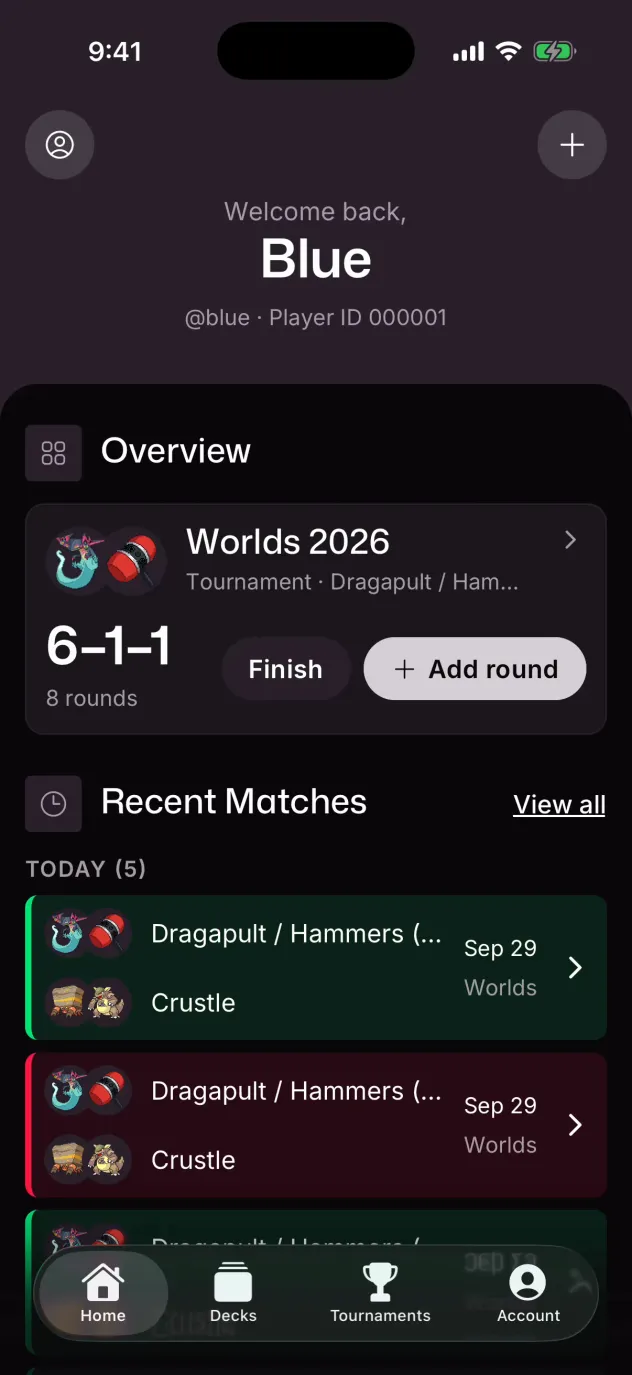
Step 1: Log every match
Paste your list from PTCG Live or Limitless once. Then log each match: paste the battle log, or fill in one short form between rounds.
How logging worksStep 2: Review the turns
A pasted battle log becomes a replay you step through turn by turn, with both boards and your hand.
See a replayStep 3: Read your matchups
Your record and win rate against every deck you face, so you know which matchups to test.
See the matchup spreadStep 4: Change the list
Save a changed list as v1.2. Each version keeps its own matches, so you can compare their results.
See deck versions
Match tracker
A match tracker for PTCG Live, locals and Regionals
DeckSequence is a Pokémon TCG match tracker for ladder and paper play. A match on PTCG Live at home and round 6 at a Regional go into the same history, and the analysis reads them together.
PTCG Live battle logs
Paste the battle log and the result, turn order and prizes fill in for you. The match becomes a replay, shown in full below.
Paper matches between rounds
Your deck version, the opponent's deck, who went first, prizes for each side and the result, in one short form.
Tournaments round by round
Fill in Locals, Cups and Regionals while the event is still running. Each round joins the rest of your record.
On your phone and on the web
The iPhone and Android apps share one account with the web app, so a round logged at the table is there on your laptop.
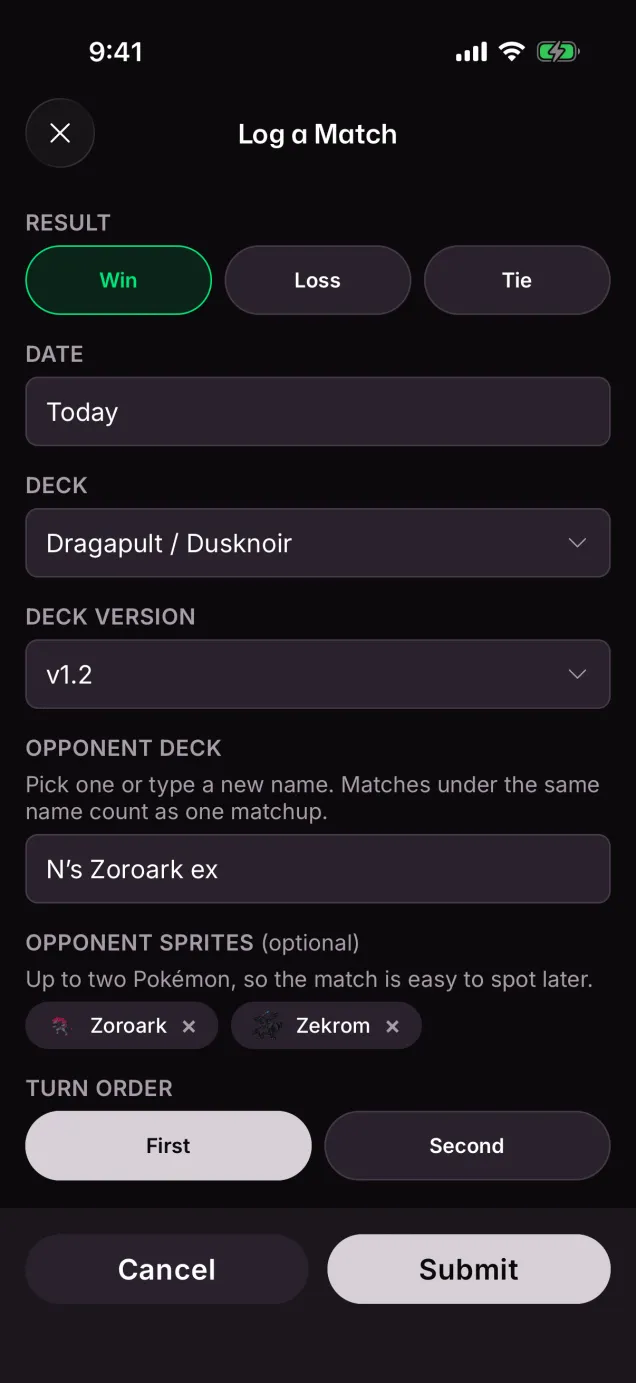
- Result
- Win
- Turn order
- Went first
- Prizes taken
- 6–3
vs N's Zoroark ex · v1.2 · Sep 12
PTCG Live battle logs
Paste the battle log and the match logs itself
Copy the log at the end of a PTCG Live match and paste it in. The result, turn order and prizes fill in from the log, and every card both players drew and played becomes a replay you can step through.
Setup
Bea chose tails for the opening coin flip.
Alex won the coin toss.
Alex decided to go first.
Alex drew 7 cards for the opening hand.
- 7 drawn cards.
   • (me1_76) Riolu, (me1_72) Makuhita, (me1_116) Fighting Gong, (me1_131) Ultra Ball, (me1_119) Lillie's Determination, (sve_6) Basic Fighting Energy, (me1_130) Switch
Bea drew 7 cards for the opening hand.
- 7 drawn cards.
Alex played (me1_76) Riolu to the Active Spot.
Alex played (me1_72) Makuhita to the Bench.
Bea played (me1_1) Bulbasaur to the Active Spot.
Bea played (me1_8) Chikorita to the Bench.
Bea played (sv6_25) Teal Mask Ogerpon ex to the Bench.

Alex's Turn
Alex drew (me1_77) Mega Lucario ex.
Alex played (me1_116) Fighting Gong.
- Alex drew (me1_76) Riolu.
- Alex shuffled their deck.
Alex played (me1_76) Riolu to the Bench.
Alex attached (sve_6) Basic Fighting Energy to (me1_76) Riolu in the Active Spot.
Alex ended their turn.

Bea's Turn
Bea drew a card.
Bea played (me1_119) Lillie's Determination.
- Bea shuffled 4 cards into their deck.
- Bea drew 8 cards.
Bea's (sv6_25) Teal Mask Ogerpon ex used Teal Dance.
- Bea attached (sve_1) Basic Grass Energy to (sv6_25) Teal Mask Ogerpon ex on the Bench.
- Bea drew a card.
Bea played (me1_1) Bulbasaur to the Bench.
Bea attached (sve_1) Basic Grass Energy to (me1_1) Bulbasaur on the Bench.
Bea ended their turn.

Alex's Turn
Alex drew (sve_6) Basic Fighting Energy.
Alex evolved (me1_76) Riolu to (me1_77) Mega Lucario ex in the Active Spot.
Alex attached (sve_6) Basic Fighting Energy to (me1_77) Mega Lucario ex in the Active Spot.
- Result
- Win
- Turn order
- Went first
- Prizes taken
- 6–4
- Turns
- 9
Mega Lucario ex vs Mega Venusaur ex
PTCG Live replay
Mega Lucario ex vs Mega Venusaur ex

 210
 70


Hand4


Hand4
Matchup tracker
Know your matchup win rates before the next event
Every deck you've faced, with your record and win rate against each one, so you can see which matchups carry your deck and which ones to test before you register.
Split by where you played
Look at ladder, locals or Regionals on their own, so a run of online matches doesn't hide how the deck does in paper.
Honest about small samples
Under 5 matches you see the record only, so a 3–0 start never shows up as a 100% matchup.
- N's Zoroark ex12–13 · 25 matches48%
- Ogerpon Kangaskhan13–12 · 25 matches52%
- Crustle5–5 · 10 matches50%
- Alakazam Dusknoir5–4 · 9 matches56%
- Alakazam Dudunsparce5–1 · 6 matches83%
- Dragapult ex3–0 · 3 matchesRecord only
- Basic Box1–1 · 2 matchesRecord only


Deck versions
See which deck version wins
Changed a few cards before a League Cup? Save the list as a new version. Its matches stay with it, so you can see whether the change won more, and against which decks.
Every change, card by card
Each version shows what it added and cut from the one before, with the card art, so you always know which list you played.
A win rate for each version
Every version keeps its own record, and its win rate sits next to the version it came from.
One matchup, version by version
Ogerpon Kangaskhan went from 1–5 on v1.0 to 6–2 on v1.1, the version that added the Dusknoir line.
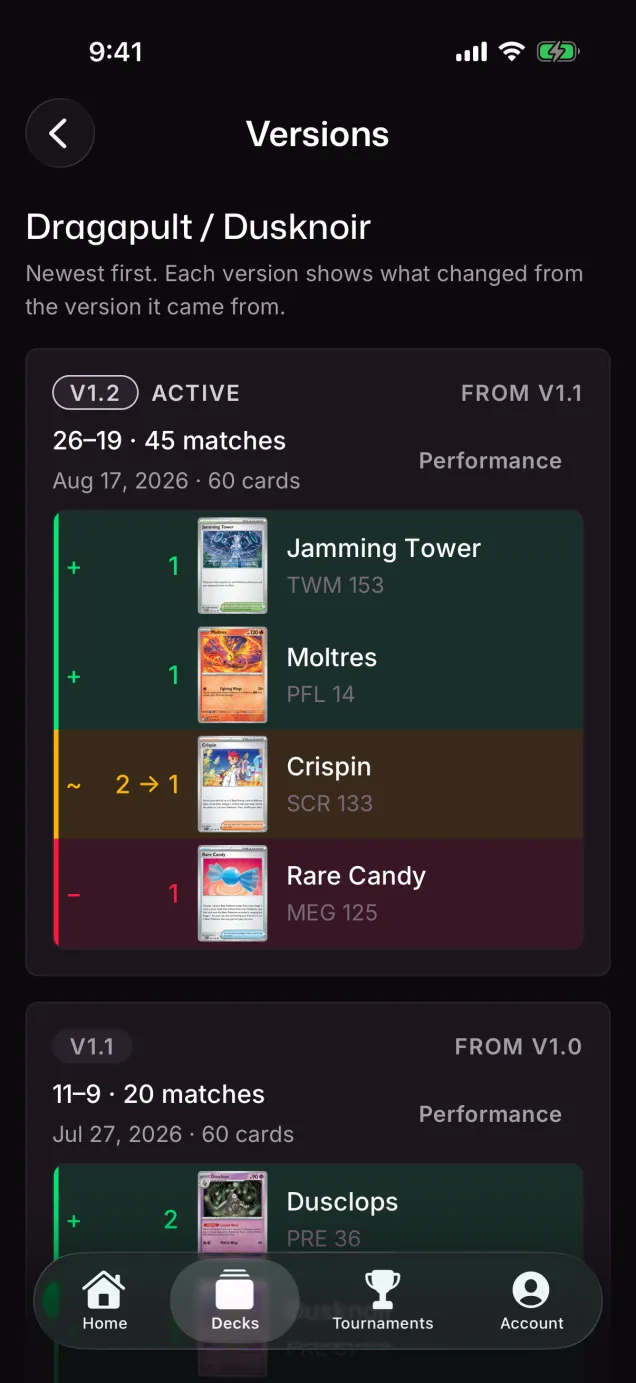
- All matches7–847%then11–955%
- vs Ogerpon Kangaskhan1–517%then6–275%
v1.1 added 2 Duskull, 2 Dusclops and 1 Dusknoir
Card usage
See which cards you actually play
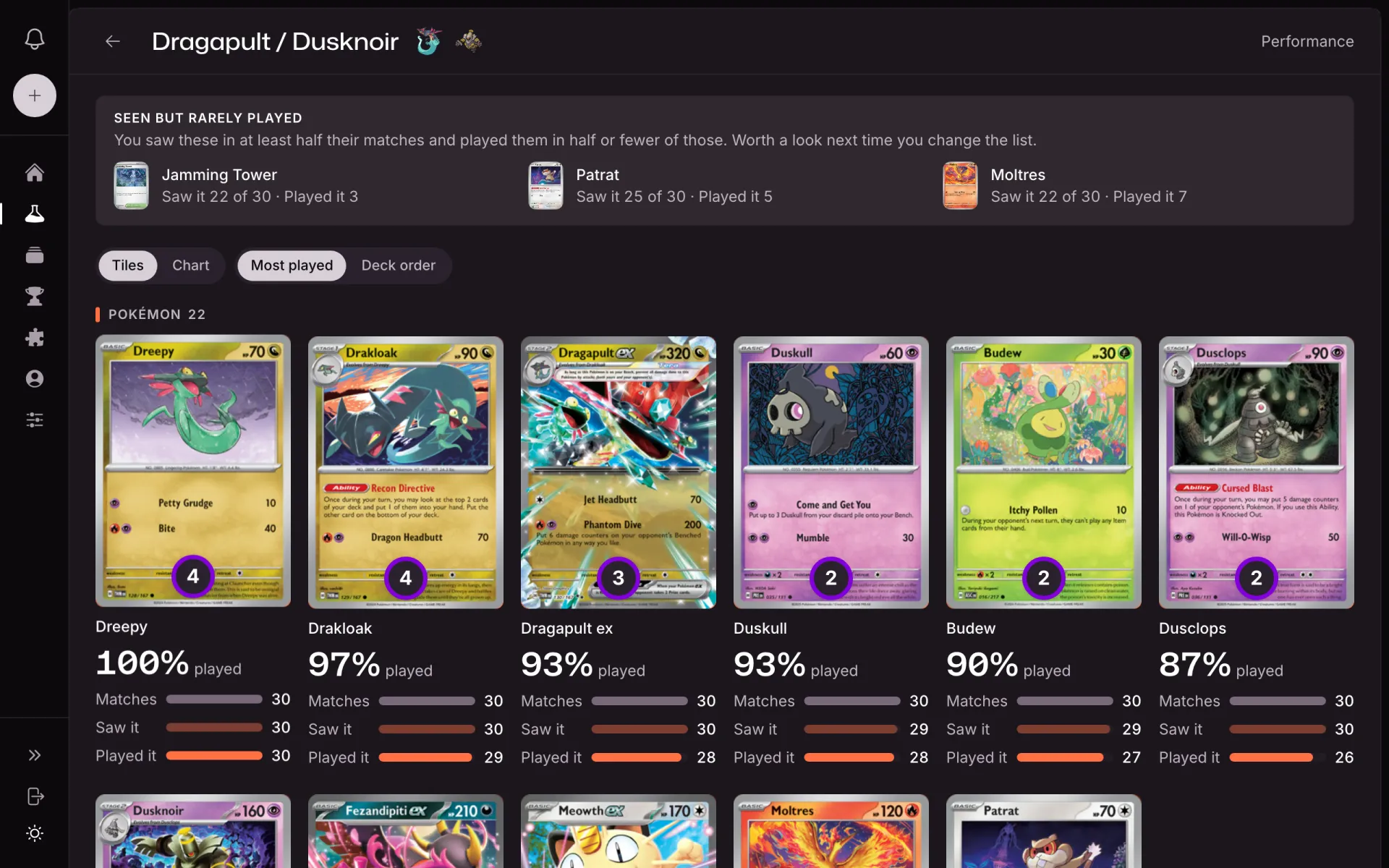
Every PTCG Live battle log you paste also counts what your own cards did. Across a deck's logs, each card in the list shows how often it reached your hand and how often you played it.
Saw it, played it
Drawn, searched, opened with or taken as a Prize counts as seen. Played, attached, evolved into or attacked with counts as played.
Seen but rarely played
The cards you keep drawing and rarely play are pulled out on their own, so the dead slot is easy to spot before the next list change.
Your record with and without it
Open a card to see your record in the matches you played it, next to the matches you didn't.
Before the event
Tools for the week before an event
Check the list, practice the opening hand, print the decklist and log a night of ladder as one session. Each card opens the tool or a short guide to it.
Opening-hand odds
Play Hands shows your mulligan rate and the chance to see a card by each turn, so you know what cutting the fourth copy costs.
Import and export
Paste a PTCG Live or Limitless export to build a deck, and copy it back in PTCG Live's format when you need it.
Tournament decklist
Fill in the Play! Pokémon deck registration sheet from any version of your deck, ready to print.
Competitive decklists
Lists from Regionals and Worlds, credited to the players who built them, with the odds for each one.
Deck builder
Build a Standard deck in your browser and check its opening hands before you make an account.
Sessions
Group a night of ladder or locals into one session, with that session's record as you play.
Ready to learn what wins?
Try Pro free for 30 days.
Pricing
Log every match for free. Pro adds your matchup and version win rates.
Pro unlocks the analytics on top of your record: win rate per matchup, win rate per deck version, head-to-head version comparison, and how often each card is seen and played in your battle logs.
Free
Log every match, replay your PTCG Live battle logs, keep every version of your decks and track your tournaments. All of it stays free, with no cap.
Included
- Unlimited match logging, paper and PTCG Live
- Battle-log replays, turn by turn
- Deck lab with version history
- Tournaments, round by round
- Overall and per-deck win rate and record
- Every opponent deck you have faced, and how many matches against each
No card required
$0forever
Create a free accountEvery new account also starts with Pro for 30 days, no card. When it ends, your account moves to Free on its own. Nothing is deleted and nothing is charged.
What Pro adds
Pro changes only the analysis on top of your record. On Free you still see every opponent deck you have faced and how many matches you played against each. Pro shows the win rate and the W/L/T record behind those counts.
ProSave 28%
$59.99per year
$83.88 if billed monthly
Win rates and W/L/T records on top of everything you already log for free.
Try Pro freeEverything in Free, plus
- Win rate per matchup
- Win/loss/tie record per opponent deck
- Win/loss/tie record per matchup, by deck version
- Win rate per deck version
- Head-to-head version comparison
- How often each card is seen and played, from battle logs
30 days with no card. When it ends, your account moves to Free.
Plus applicable taxes, shown at checkout.
Frequently asked questions
Can't find the answer you're looking for? Ask on the support page.
- Is DeckSequence free?
- Logging is free. Match logging, battle-log replays, decks with versions, tournaments, sharing and your overall and per-deck win rate and record cost nothing and have no limits. The Pro plan unlocks the analytics on top: win rate per matchup, win rate per deck version, head-to-head version comparison, and how often each card is seen and played in your battle logs. Every new account gets the full Pro plan for 30 days with no card. Current prices are on the pricing page.
- Do I need to install anything?
- No. DeckSequence runs in any modern browser, phone included. There is also an app on the App Store and Google Play. Sign in with the same account and your decks and matches are already there.
- Does it work for in-person events?
- Yes. A match is logged as online or in person, and both go into the same record. Tournaments are logged round by round, and you can fill in rounds while the event is still running.
- How does DeckSequence help me get better?
- It keeps one record of every match you play, on PTCG Live and in paper, with the deck version you played each one with. When you change your list, the new version starts its own record, so you can compare the versions' results. PTCG Live matches also become replays you can step through turn by turn. With Pro, the record reads back as your win rate against each deck you face and with each version of your list, and how often each card was seen and played.
- How do my matches get in?
- You log each match with the date, deck version, whether it was online or in person, the opponent's deck, who went first, prizes for each side and any notes. For a PTCG Live match you can also paste the battle log, and the match becomes a replay you can step through turn by turn.
- How do I replay a PTCG Live battle log?
- Copy the battle log from PTCG Live (PTCGL) after the match, with card IDs turned on in its settings. Log the match in DeckSequence with PTCG Live as the environment and paste the log into the Battle Log field. With your PTCG Live username on your account, the result, turn order and prizes fill in from it. The match becomes a replay with both boards and your hand at every step.
- Can I import a decklist I already have?
- Yes. Paste a PTCG Live or Limitless export and it becomes a deck you can version, test in Play Hands and log matches with. If the export is missing card IDs, the app tells you how to turn them back on.
- Who can see my decks and matches?
- Only you, until you create a share link. Sharing is per match: you make the link, you can hide the decklist on it, shared pages are set to stay out of search results, and you can revoke the link at any time.
- Can I delete my account and everything in it?
- Yes. The account deletion page walks you through it, and you can write to privacy@decksequence.com with any question about your personal information.
- Is DeckSequence affiliated with Pokémon?
- No. DeckSequence is an independent tool, not affiliated with, endorsed, sponsored, or specifically approved by Nintendo, Creatures Inc., GAME FREAK inc., or The Pokémon Company. All trademarks are property of their respective owners.